Examples
We provide some examples how to use the code to calculate a variational optimization for typical 2d many-body problems in the examples/ folder of the variPEPS Git repository.
In this section we want to elaborately walk through the example for the Heisenberg AFM on the 2d square lattice to explain a typical usage of the library.
Heisenberg antiferromagnet on the square lattice
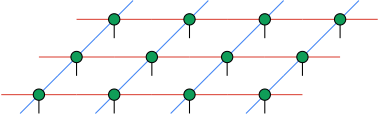
Two dimensional square lattice
The Hamiltonian for the Heisenberg antiferromagnet with constant exchange interaction strength \(J>0\) is defined as:
where \(\langle i j \rangle\) denotes the sum over all nearest neighbors in the lattice.
Our aim is now to find the ground state of the model using the variational iPEPS code of the variPEPS library.
Loading of relevant Python modules
import varipeps
import jax
import jax.numpy as jnp
First of all we have to load the relevant Python modules for our simulation. The
varipeps module includes the full library to perform the variational
optimization. Internally it is based on the jax framework and its
numpy-like interface to execute the calculations. Since we need to define
arrays later to define for example the Hamiltonian, we need to load this numpy
interface as well.
variPEPS config settings
# Config Setting
## Set maximal steps for the CTMRG routine
varipeps.config.ad_custom_max_steps = 100
## Set maximal steps for the fix point routine in the gradient calculation
varipeps.config.ctmrg_max_steps = 100
## Set convergence threshold for the CTMRG routine
varipeps.config.ctmrg_convergence_eps = 1e-7
## Set convergence threshold for the fix point routine in the gradient calculation
varipeps.config.ad_custom_convergence_eps = 5e-8
## Enable/Disable printing of the convergence of the single CTMRG/gradient fix point steps.
## Useful to enable this during debugging, should be disabled for batch runs
varipeps.config.ctmrg_print_steps = True
varipeps.config.ad_custom_print_steps = False
## Select the method used to calculate the descent direction during optimization
varipeps.config.optimizer_method = varipeps.config.Optimizing_Methods.CG
## Select the method used to calculate the (full) projectors in the CTMRG routine
varipeps.config.ctmrg_full_projector_method = (
    varipeps.config.Projector_Method.FISHMAN
)
## Set maximal steps for the optimization routine
varipeps.config.optimizer_max_steps = 2000
## Increase enviroment bond dimension if truncation error is below this value
varipeps.config.ctmrg_heuristic_increase_chi_threshold = 1e-4
The varipeps library allows to configure a large amount of numerical
parameters to fine-tune the simulation. In this example we include some common
options someone can set for a optimization run. For a long and detailed
description of the config option we want to point to the API description of the
config class: varipeps.config.VariPEPS_Config.
Model parameters
# Set constants for the simulation
modelName = "HeisenbergModel"
# Interaction strength
J = 1
# iPEPS bond dimension
chiB = 2
# Physical dimension
p = 2
# Maximal enviroment bond dimension
maxChi = 36
# Start value for enviroment bond dimension
startChi = chiB**2 if chiB**2 < maxChi else maxChi
In this block we define some parameters for the model we want to simulate as the
interaction strength, the physical dimension of our tensor network and the iPEPS
bond dimension. In the last two lines the start and the maximal enviroment bond
dimension is defined. A feature of the variPEPS library is that it not only
supports simulation at a fixed enviroment bond dimension but also a heurisitic
increase/decrease of the dimension up to a maximal value if the maximal
truncation error in the CTMRG project calculation is above/below some
threshold. See in the config block above the parameter
ctmrg_heuristic_increase_chi_threshold which sets for example the threshold
when to increase the refinement parameter. The maximal bond dimension ensures
that the parameter does no increase to too large values where the memory and
computational resources are exhausted.
Constructing the Hamiltonian
# define spin-1/2 matrices
Id = jnp.eye(2)
Sx = jnp.array([[0, 1], [1, 0]]) / 2
Sy = jnp.array([[0, -1j], [1j, 0]]) / 2
Sz = jnp.array([[1, 0], [0, -1]]) / 2

# construct Hamiltonian terms
hamiltonianGates = J * (jnp.kron(Sx, Sx) + jnp.kron(Sy, Sy) + jnp.kron(Sz, Sz))

# create function to compute expectation values for the square Heisenberg AFM
exp_func = varipeps.expectation.Two_Sites_Expectation_Value(
    horizontal_gates=(hamiltonianGates,),
    vertical_gates=(hamiltonianGates,),
)
Here the Hamiltonian is constructed for our model. The Heisenberg AFM on the
square lattice can be described by the sum of the spin-spin interactions over
the horizontal and vertical bonds. Since we assume in our example a constant
interaction strength for all bonds, the expectation value can be calculated by
the same two site interaction tensor applied in all nearest neighbor
directions. The expectation function exp_func is later used in the
optimization to calculate the energy which is used as cost function to obtain
the ground state.
Initial unit cell construction
# Unit cell structure
structure = [[0, 1], [1, 0]]
Here we define the unit cell structure which is used to simulate our model. In this example we assume a \(\scriptsize{\begin{matrix}A&B\\B&A\end{matrix}}\)-structure.
# Create random initialization for the iPEPS unit cell
unitcell = varipeps.peps.PEPS_Unit_Cell.random(
    structure,  # Unit cell structure
    p,  # Physical dimension
    chiB,  # iPEPS bond dimension
    startChi,  # Start value for enviroment bond dimension
    float,  # Data type for the tensors: `float` (real) or `complex` tensors
    max_chi=maxChi,  # Maximal enviroment bond dimension
)
Using the unit cell structure and the model parameter defined above, we can generate an initial unit cell. Here we initialize the iPEPS tensors with random numbers. Of course one could use other ways to initialize the tensors, for example results from a simple update calculation.
Run the optimization
# Run optimization
result = varipeps.optimization.optimize_peps_network(
    unitcell,
    exp_func,
    autosave_filename=f"data/autosave_square_chiB_{chiB:d}.hdf5",
)
This function call executes the main function of the library, the variational optimization run to obtain a good ground state candidate. The function has several option to adapt the optimization for different ansätze (for example the spiral iPEPS approach). In our example we just need to supply the initial unit cell, the function to calculate the energy expectation value and to allow to restore an aborted simulation a file name for autosaves of the optimization.
Evaluate the results
In this section we show some exemplary evaluation of the result of the optimization.
# Calculate magnetic expectation values
Mag_Gates = [Sx, Sy, Sz]


def calc_magnetic(unitcell):
    mag_result = []
    for ti, t in enumerate(unitcell.get_unique_tensors()):
        r = varipeps.expectation.one_site.calc_one_site_multi_gates(
            t.tensor, t, Mag_Gates
        )
        mag_result += r
    return mag_result


magnetic_exp_values = calc_magnetic(result.unitcell)
We assume for our example that we are interested in the single-site magnetic expectation values. These could be used to analyse the \(z\)-magnetization or the staggered magnetization of our model at/near the ground state.
# Define some auxiliary data which should be stored along the final iPEPS unit cell
auxiliary_data = {
    "best_energy": result.fun,
    "best_run": result.best_run,
    "magnetic_exp_values": magnetic_exp_values,
}
for k in sorted(result.max_trunc_error_list.keys()):
    auxiliary_data[f"max_trunc_error_list_{k:d}"] = result.max_trunc_error_list[k]
    auxiliary_data[f"step_energies_{k:d}"] = result.step_energies[k]
    auxiliary_data[f"step_chi_{k:d}"] = result.step_chi[k]
    auxiliary_data[f"step_conv_{k:d}"] = result.step_conv[k]
    auxiliary_data[f"step_runtime_{k:d}"] = result.step_runtime[k]

# save full iPEPS state
result.unitcell.save_to_file(
    f"data/heisenberg_square_J_{J:d}_chiB_{chiB:d}_chiMax_{chiM:d}.hdf5",
    auxiliary_data=auxiliary_data,
)
Finally, we want to save the unit cell with the optimized tensors to a file for later further evaluation. The library allows to store the data directly into a HDF5 file along with user-supplied auxiliary data. Here for example not only want to store the plain tensors but also the calculated energy, meta information from the optimization run (e.g. energy per step or the runtime per step) and the calculated magnetic expectation values. At a later examination of the results, these data can be easily loaded along with the tensors of the tensor network.